Reaction Speed Tester
In this advanced project, we’ll create a reaction speed testing game that measures how quickly you can respond to visual cues. The game uses a 7-segment display to show your reaction time and provides multiple rounds of testing with performance feedback!
Circuit
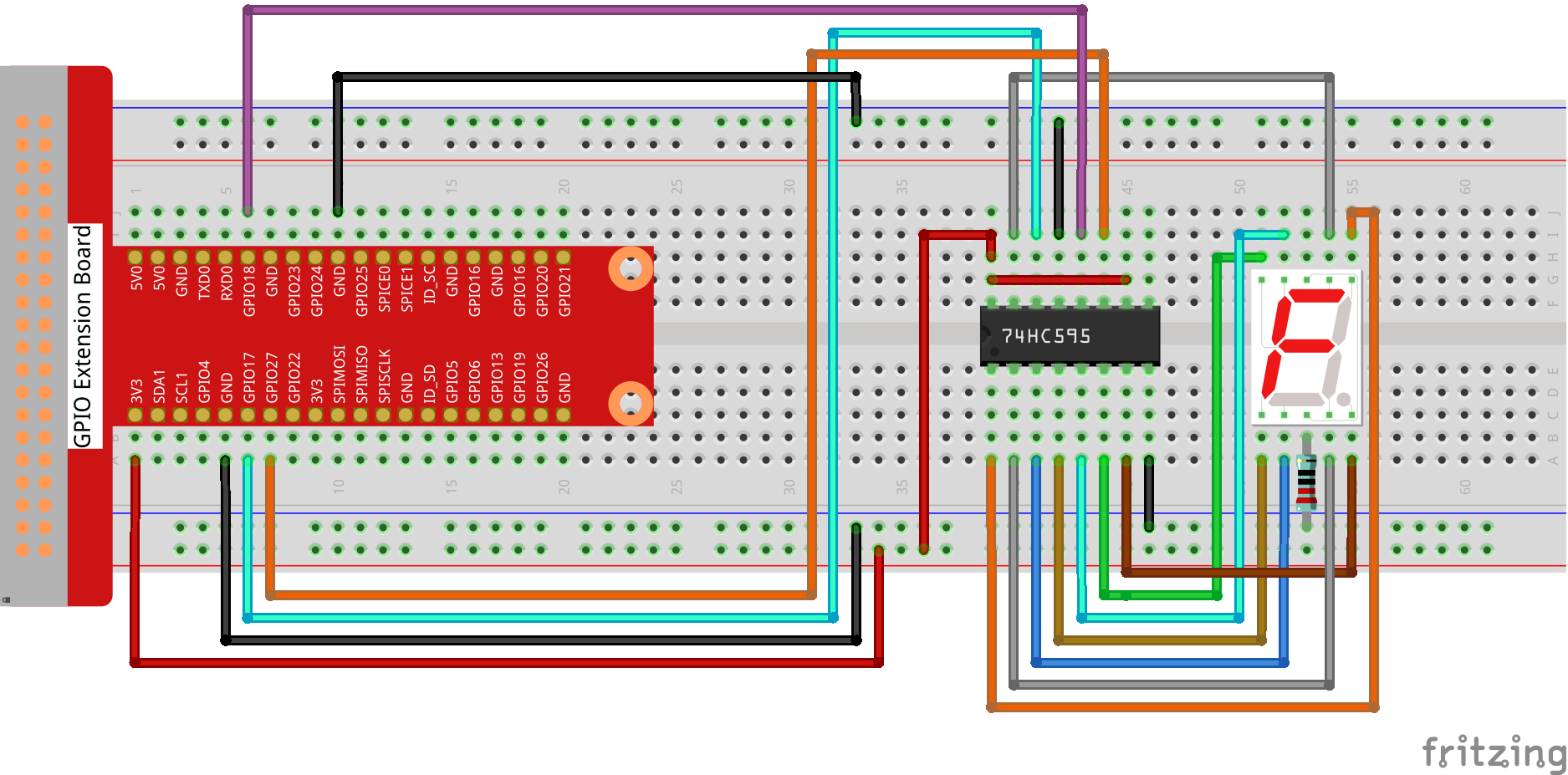
Sketch
// Reaction-Speed Tester – 7-Segment Display Edition
import processing.io.*;

// 74HC595 pins
int SDI   = 17;   // serial data in
int RCLK  = 18;   // register clock (latch)
int SRCLK = 27;   // shift-clock

// common-cathode segment codes 0-9
int[] segCode = {0x3f, 0x06, 0x5b, 0x4f, 0x66, 0x6d, 0x7d, 0x07, 0x7f, 0x6f};

// game states
int state = 0;
int start, reaction = 0;
int best = 9999;
boolean spacePressed = false;
int round = 1;
int maxRounds = 5;

// countdown
int cdStart, cdDuration;

void setup() {
    size(600, 400);
    frameRate(60);

    GPIO.pinMode(SDI,   GPIO.OUTPUT);
    GPIO.pinMode(RCLK,  GPIO.OUTPUT);
    GPIO.pinMode(SRCLK, GPIO.OUTPUT);

    hc595_shift(segCode[0]);
}

void draw() {
    switch (state) {
        case 0: drawWelcome(); break;
        case 1: drawCountdown(); break;
        case 2: drawWait(); break;
        case 3: drawReaction(); break;
        case 4: drawResult(); break;
    }
    spacePressed = false;
}

// ------------------------------------------------------------------
//  SCREENS
// ------------------------------------------------------------------
void drawWelcome() {
    background(50, 50, 100);

    fill(255, 255, 100);
    textAlign(CENTER);
    textSize(48);
    text("Reaction Test", width / 2, height / 2 - 100);

    textSize(24);
    fill(255);
    text("Test your reaction speed!", width / 2, height / 2 - 40);
    text("Press SPACE as soon as you see 'GO!'", width / 2, height / 2 - 10);
    text("7-segment shows your time", width / 2, height / 2 + 20);

    textSize(20);
    fill(100, 255, 100);
    text("Round " + round + " / " + maxRounds, width / 2, height / 2 + 60);

    textSize(32);
    fill(255, 100, 100);
    text("Press SPACE to start!", width / 2, height / 2 + 120);

    if (best < 9999) {
        textSize(18);
        fill(255, 255, 0);
        text("Best: 0." + nf(best, 3) + " s", width / 2, height / 2 + 160);
    }

    hc595_shift(segCode[0]);

    if (spacePressed) {
        state = 1;
        cdStart = millis();
        cdDuration = int(random(2000, 5000));
    }
}

void drawCountdown() {
    background(100, 50, 50);

    fill(255, 100, 100);
    textAlign(CENTER);
    textSize(72);
    text("Ready...", width / 2, height / 2 - 50);

    textSize(24);
    fill(255, 200, 200);
    text("Wait for GO!", width / 2, height / 2 + 30);
    text("Don’t press early!", width / 2, height / 2 + 60);

    int elapsed = millis() - cdStart;
    int remain  = max(0, (cdDuration - elapsed) / 1000 + 1);
    if (remain > 0) hc595_shift(segCode[min(remain, 9)]);

    if (spacePressed) {
        state = 4;
        reaction = -1; // false start
        return;
    }

    if (elapsed >= cdDuration) {
        state = 2;
        start = millis();
    }
}

void drawWait() {
    background(100, 100, 50);

    fill(255, 255, 100);
    textAlign(CENTER);
    textSize(96);
    text("GO!", width / 2, height / 2);

    textSize(24);
    fill(255, 255, 200);
    text("Press SPACE now!", width / 2, height / 2 + 80);

    hc595_shift(segCode[8]); // show 8 for GO!

    if (spacePressed) {
        reaction = millis() - start;
        state = 3;
    }

    if (millis() - start > 2000) {
        reaction = 9999; // timeout
        state = 4;
    }
}

void drawReaction() {
    background(50, 100, 50);

    fill(100, 255, 100);
    textAlign(CENTER);
    textSize(48);
    text("Reaction:", width / 2, height / 2 - 40);

    textSize(72);
    text("0." + nf(reaction, 3) + " s", width / 2, height / 2 + 20);

    int digit = (reaction / 100) % 10;
    hc595_shift(segCode[digit]);

    if (millis() - start > 2000) state = 4;
}

void drawResult() {
    if (reaction == -1) {           // false start
        background(150, 50, 50);
        fill(255, 100, 100);
        textAlign(CENTER);
        textSize(48);
        text("False Start!", width / 2, height / 2 - 40);
        textSize(24);
        text("Wait for the GO! signal", width / 2, height / 2 + 20);
        hc595_shift(segCode[0]);
    } else if (reaction >= 9999) {  // timeout
        background(100, 50, 50);
        fill(255, 150, 100);
        textAlign(CENTER);
        textSize(48);
        text("Too Slow!", width / 2, height / 2 - 40);
        textSize(24);
        text("> 2 s timeout", width / 2, height / 2 + 20);
        hc595_shift(segCode[9]);
    } else {                        // valid result
        background(50, 100, 100);
        fill(100, 255, 255);
        textAlign(CENTER);
        textSize(36);
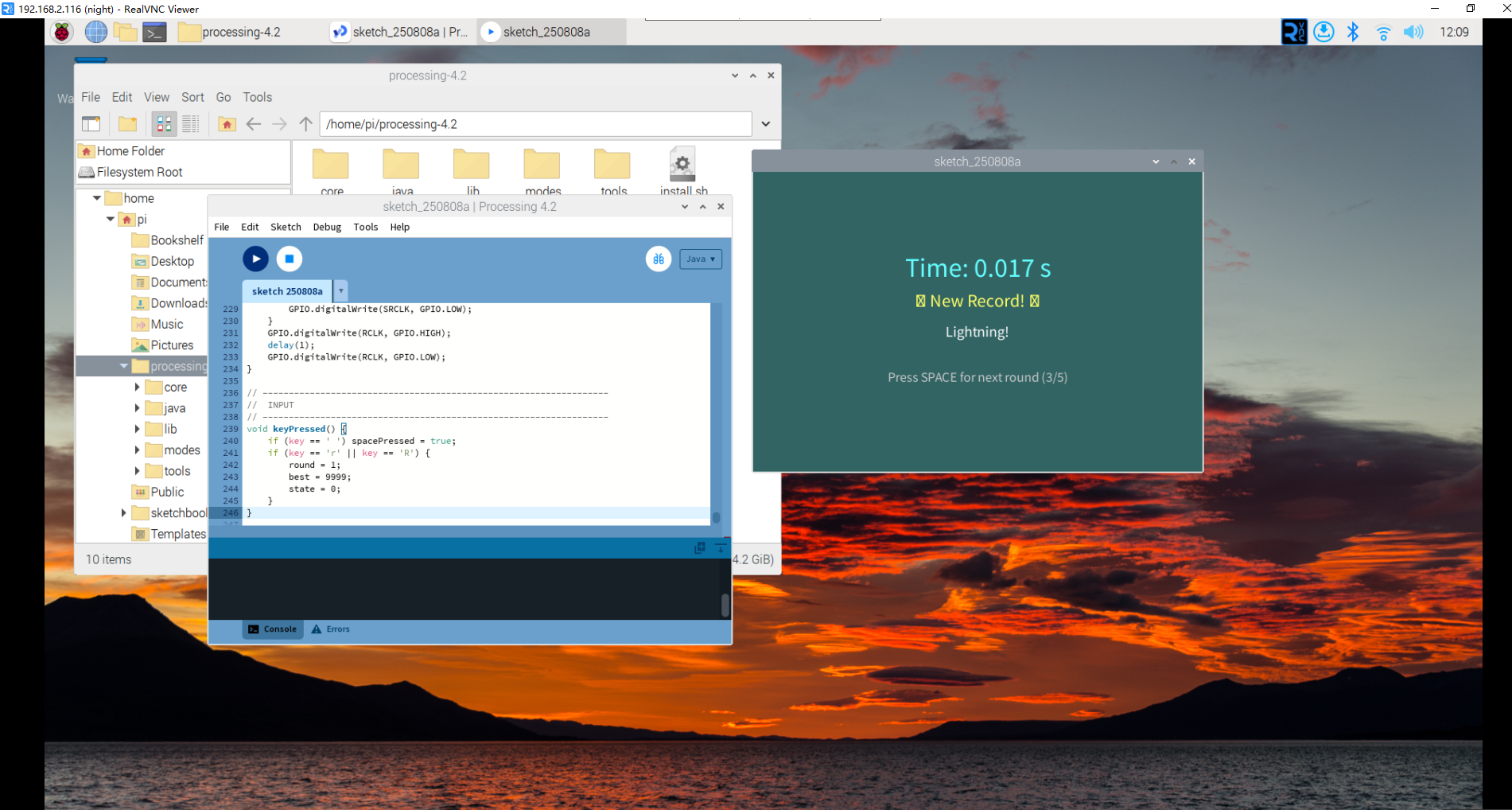
        text("Time: 0." + nf(reaction, 3) + " s", width / 2, height / 2 - 60);

        if (reaction < best) {
            best = reaction;
            fill(255, 255, 100);
            textSize(24);
            text("🎉 New Record! 🎉", width / 2, height / 2 - 20);
        }

        String rating = "";
        if (reaction < 200) rating = "Lightning!";
        else if (reaction < 300) rating = "Very fast!";
        else if (reaction < 400) rating = "Fast!";
        else if (reaction < 500) rating = "Good!";
        else rating = "Keep practising";

        fill(255);
        textSize(20);
        text(rating, width / 2, height / 2 + 20);

        int digit = (reaction / 100) % 10;
        hc595_shift(segCode[digit]);
    }

    // next or finish
    fill(200);
    textSize(18);
    if (round < maxRounds) {
        text("Press SPACE for next round (" + (round + 1) + "/" + maxRounds + ")",
            width / 2, height / 2 + 80);
        if (spacePressed) {
            round++;
            state = 0;
        }
    } else {
        text("Done! Best time: 0." + nf(best, 3) + " s", width / 2, height / 2 + 80);
        text("Press R to restart", width / 2, height / 2 + 110);
    }
}

// ------------------------------------------------------------------
//  74HC595 helper
// ------------------------------------------------------------------
void hc595_shift(int data) {
    for (int i = 0; i < 8; i++) {
        int bit = (data << i) & 0x80;
        GPIO.digitalWrite(SDI, bit != 0 ? GPIO.HIGH : GPIO.LOW);
        GPIO.digitalWrite(SRCLK, GPIO.HIGH);
        delay(1);
        GPIO.digitalWrite(SRCLK, GPIO.LOW);
    }
    GPIO.digitalWrite(RCLK, GPIO.HIGH);
    delay(1);
    GPIO.digitalWrite(RCLK, GPIO.LOW);
}

// ------------------------------------------------------------------
//  INPUT
// ------------------------------------------------------------------
void keyPressed() {
    if (key == ' ') spacePressed = true;
    if (key == 'r' || key == 'R') {
        round = 1;
        best = 9999;
        state = 0;
    }
}
How it works?
This reaction speed tester demonstrates advanced game programming and precise timing measurement:
Game State Management: - 5 Game States: Welcome (0), Countdown (1), Wait for GO (2), Show Reaction (3), Results (4) - State Machine: Clean transitions between different game phases - Round System: 5 rounds of testing with progress tracking - Session Memory: Tracks best time across all rounds
Reaction Time Measurement:
- Precise Timing: Uses millis() for millisecond-accurate measurements
- Random Delays: 2-5 second countdown prevents anticipation cheating
- False Start Detection: Penalizes early button presses during countdown
- Timeout Handling: 2-second limit prevents indefinite waiting
7-Segment Display Integration: - 74HC595 Control: Uses shift register for efficient 7-segment driving - Dynamic Display: Shows countdown numbers, GO signal (8), and reaction digits - Meaningful Feedback: Displays the tens-of-milliseconds digit (0.1-0.9 seconds) - Status Indication: Different numbers for different game states
User Interface Design: - Multi-Screen Layout: Professional game flow with distinct visual phases - Color-Coded States: Different background colors for each game phase - Performance Feedback: Ratings from “Lightning!” to “Keep practising” - Progress Tracking: Shows current round and session statistics
Advanced Timing Logic: The core timing calculation works as follows: - Countdown Phase: Random 2-5 second delay prevents pattern recognition - GO Signal: Precisely records the moment GO appears - Response Detection: Measures exact time between GO and spacebar press - Accuracy: Displays reaction time as 0.XXX seconds format
Game Features: - False Start Protection: Pressing space during countdown triggers penalty - New Record Celebration: Visual feedback for personal best times - Performance Rating System: Contextual feedback based on reaction speed - Session Statistics: Tracks and displays best time across all rounds
Hardware Synchronization: - Real-time Display: 7-segment shows relevant information for each game state - Immediate Feedback: Display updates instantly with game state changes - Visual Consistency: Screen and hardware display work together
Programming Concepts: - State Machines: Clean game flow management - Precise Timing: Millisecond-accurate measurements - Hardware Control: GPIO and shift register manipulation - User Experience: Professional game design principles - Data Validation: False start and timeout error handling
Educational Value: - Reaction Science: Learn about human response times and factors affecting them - Timing Systems: Understand how computers measure precise time intervals - Game Design: Experience complete game development lifecycle - Hardware Integration: See how software and hardware work together
This project bridges gaming, science, and engineering - perfect for understanding both human performance and computer precision!